After nine years on Teachable, I’ve launched SmarterGerman’s own learning platform. More than 2,500 hours went into building it. Existing learners are moving over now, and dedicated iOS and Android apps are coming next.
I wanted the software to support the way I teach: a clear route through German, room to practise what still feels difficult, and help when an explanation has not quite clicked. The courses remain familiar. The experience around them has changed considerably.
For a long time, building that environment myself seemed out of reach. I could see the small frustrations, and I had plenty of ideas for improving them. Turning those ideas into a working platform was another matter. As a solo teacher running a business, I had to choose between what I wanted learners to have and what I could reasonably afford to commission and maintain.
This launch has let me close almost all of those gaps. I want to show what has changed, including the ordinary details that can make a study session feel easier to begin and more satisfying to finish.
Why I chose Teachable in the first place
I chose Teachable largely because of its outstanding support. Almost a decade later, that is still something I appreciate about the company. When you run a business on your own, having helpful people to turn to matters. Teachable has continued to provide that throughout my time with it.
Its merchant-of-record role was another important reason: it collected payments and handled applicable sales tax and VAT in the markets its native gateway covered, then paid out the proceeds. That took a considerable amount of international payment administration off my desk. The precise payment and tax responsibilities depend on the country and gateway.
I am moving because I can now build the learning environment I have wanted for years. I still appreciate what Teachable did well, and the support that helped me keep my courses running.
How I accumulated workarounds
Teachable gave my courses a home for nine years. Over time, I accumulated workarounds and ended up managing four other services around it, plus a few smaller ones: Circle for the community, Learnclick for nicer quizzes, and GitHub and Dropbox for interactive tools Teachable could not host.
Each solved a particular problem. Maintaining the connections was painful and costly. The main platform and those four subscriptions alone came to about €2,100 a year at the recorded rates, before payment-processing fees, smaller services or development and maintenance work. A change could mean checking several places, adapting an embedded tool or arranging more development work. I spent tens of thousands on developers over the years, while still having to work around the limits of the platform.
The money was only part of the difficulty. The back-and-forth took its toll: explaining what I wanted, reviewing a version, describing what still did not feel right, and going through another round until the tool finally worked as I had intended. A small teaching detail could take a surprising amount of time to communicate and refine.
The difficulty was rarely just one broken feature. It was the growing amount of work needed to keep everything coherent. The course lived in one system, its discussions in another, and some of the practice tools somewhere else again. I was responsible for the learning experience, but I could only influence parts of the software that delivered it.
Now I can change many things with a prompt or a database edit. I no longer have to hire a developer whenever I want to build or adjust a teaching tool. The work still needs thought and testing, but the distance between noticing a problem and doing something about it has become much shorter.
If an explanation needs improving, a tool needs a different practice sequence, or an awkward interaction gets in the way, I can work on it directly. That changes how I think about developing the courses. Ideas that used to sit on a list waiting for a budget or an available developer can become something learners actually use.
The administrative side had gaps, too. I wanted a financial dashboard that answered my own business questions, and a straightforward way to block someone behaving abusively. The old arrangements did not handle those jobs as well as I needed. Building my own environment lets me decide how these ordinary but important controls should work.
More control over learner data
My GDPR responsibilities are another reason I need meaningful control over learner data: what I collect, why I need it, where it goes, how long I keep it, and how I respond to requests about it. The GDPR’s accountability principle requires me to take responsibility for the processing I control and be able to demonstrate compliance. Running my own learning environment gives me more direct control over those decisions.
The course overview, before and now
The old learner home shown here is a course catalogue. The fair comparison is with my new course overview, where learners move between the level courses, exam material and other courses. Both screenshots show where to choose what to study.
Before - Teachable home
Now - SmarterGerman course overview
The level courses still provide the main route through the material. The surrounding navigation makes it easier to step out for focused practice, check progress or visit the community, then find your way back. I want learners to spend their attention on German, with a clear sense of where they are.
A dashboard for the next study session
The dashboard has a different job. At the beginning of a study session, the useful question is often what to do next. It brings together the route back to a lesson, the review that is due, course progress, updates and recent community activity. Those are starting points for study, beyond the list of courses someone owns.
- Continue. Return to the lesson you were working on.
- Review. Open the review that is due.
- Courses. See your courses and your position in them.
- Updates. Read changes and guidance from me.
- Community. See recent discussions and open the community.
I wanted that first screen to help someone begin, whether they are studying every day or returning after a break. A clear next step can save a small amount of friction at exactly the moment when it is easiest to postpone the session.
The same lesson, with less getting in the way
These screenshots show the same A1 reading chapter. Vocabulary lookup already existed in my Teachable course; I had put substantial work into adding it. What I can do now is make the parts work together: read the story, hear it, save a useful expression, revisit an explanation and continue studying without piecing together separate tools.
Before - Teachable lesson
Now - SmarterGerman lesson
Reader Mode clears the navigation out of the way when you want to concentrate. Press R to enter it and Escape to return. The audio and vocabulary tools stay with the text. A word saved in A1 also remains part of your vocabulary history when you meet it again in a later course, right through C1.
That continuity is useful because a word is rarely learned in one encounter. You may understand it in a story today, hesitate when you hear it next week, then recognise it immediately in a later chapter. Keeping vocabulary connected across the courses gives those encounters a shared history. Moving up a level does not mean starting a separate vocabulary collection.
Learning controls within reach
Reader Mode - more room for the lesson
- Reader Mode. Press R to hide the sidebars, then Escape to return.
- Lecture discussion. Open or start a discussion about this lecture from the upper-right corner.
- Floating audio. Play, pause, change speed and repeat sentences without returning to the top of the text.
- Lesson navigation. Back and Next stay at the lower-right corner.
- Keyboard shortcuts. Open the audio player’s shortcut guide; Space plays or pauses, arrows move between sentences, and L repeats a sentence.
- Study Timer. Open a focused study block from the sidebar.
- Flow. Check your study rhythm and weekly goal from the sidebar.
The Study Timer gives a session a manageable shape with 15, 25 or 50-minute focus blocks and breaks. Flow is the study-rhythm and streak view: a way to keep track of the days you practise and the weekly goal you have chosen. Both are close to the lesson, so checking them does not mean losing your place.
A focused study block
Your study rhythm
Comments used to annoy me. Attaching them to the bottom of a lecture could make a carefully prepared page feel cluttered and unappealing. Now a lecture’s discussion opens with a click. Learners can read it and add to it when they need to, then return their attention to the lesson.
I still want the questions and conversations. They often reveal exactly where an explanation needs another example. I also want the lecture itself to remain a calm place to work. Giving discussion its own opening keeps both purposes clear: study the material, and join the conversation when it is useful.
Something worth reading, writing and talking about
I explained this in a reply to a student: I use stories and short, interesting articles to teach German. I do not want the course to revolve around imaginary train-ticket purchases, hotel bookings and shopping dialogues. Those transactions are a very narrow slice of what a language lets you do. I want learners to be curious about the story, understand what happens next, and gradually gain the means to express themselves.
The same principle matters for writing. Give someone a situation with personality, a question worth thinking about or a story they want to continue, and there is something to say. Writing gives them time to think, notice patterns and work out how to say what they mean. The tools should support that work, including useful feedback, without reducing it to rehearsing another service transaction.
For reading, a weak exercise might be a sequence of transactions: someone buys a ticket, checks into a hotel and orders a meal. A more interesting starting point might be a woman receiving the same postcard every Monday. This week it contains a sentence only her missing brother would know. There is a reason to keep reading, and something to wonder about while the German does its work.
For writing, compare “Reserve a double room for two nights” with “You find a letter you wrote ten years ago. Write a reply to your younger self.” These are illustrative prompts, but they show the difference I mean: filling in a transaction versus having something personal to say.
The same applies to conversation practice. Repeating a scripted ticket purchase offers little room for thought. Discussing whether a character should keep a difficult promise, or explaining a decision to a friend who disagrees, gives a conversation somewhere to go. The language serves an idea, and the learner has a reason to find the words.
Help that understands how I teach
Teachable includes AI tools for creating lesson text, quizzes and summaries, and other learning platforms offer their own AI features. What matters to me is how closely the help can follow a particular teaching method. A generic German explanation may be perfectly plausible and still introduce terms or advice that pull a learner away from the course they are following.
I wanted direct control over the knowledge base and the way answers are written: my lectures, my guides, my tool instructions, my explanations. Building the assistant into my own platform lets me adjust those sources and instructions together, instead of fitting my teaching around a general-purpose AI feature.
The study assistant answers questions from my teaching material. It can explain a topic that is still unclear, revisit a learning technique, or explain how I intend a particular tool to be used.
A learner might understand the instructions and still wonder whether they are doing the exercise in the right spirit. Should they repeat the same passage? What should they listen for? What does one of those grammar terms mean? These are teaching questions as much as questions about the interface. The assistant is designed to answer from the course material and the guidance I have prepared.
Learners can choose a level, ask follow-up questions, and request examples or practice. The assistant is optional and clearly identified as AI, which can make mistakes. It is designed to stay close to my teaching material and my terminology, chosen to make grammar quicker to understand. In my opinion, that fit with the course is already surprisingly close to perfection.
I find this particularly useful for the moments when someone needs a smaller explanation before they can continue. They can ask again, change the question, or explore an example without having to leave the learning environment. The community is there for conversation and shared experience. My personal support covers technical and administrative questions.
Together, the structured course, practice tools and study assistant make it possible to work through a proper online course independently, without a personal German tutor. I do not provide German tutoring in my courses. The teaching is in the course and its learning tools; my direct support is technical and administrative.
Search is another quick route back to help. It searches course material and community discussions together. On a computer, Cmd+K or Ctrl+K opens it; on a phone, search is a tap away. You do not have to remember which lesson contained the explanation.
Review more than vocabulary
Spaced repetition is built into the whole learning environment. Vocabulary is part of it, but review can also bring back difficulties from grammar, listening, writing, dictation, reading aloud, speaking practice and lesson quizzes. Different tools contribute the work you need to revisit; the review route brings those needs together.
This was an important part of the project for me. A learner can remember the words in a sentence and still struggle to hear them, put them in the right order or say them aloud. Useful review should make room for those difficulties, too. The platform can draw on earlier practice so that returning to a weak spot becomes part of the routine.
I want learners to spend less energy deciding what they ought to repeat. Open Review from the dashboard or the lesson controls, work on what is due, and return to the course. The available review depends on what you have actually practised and where you struggled before.
That also gives the individual tools a longer purpose. A difficult exercise does not have to disappear into the past when the next lecture opens. It can contribute to later practice. Vocabulary, course work and the different skills have a closer relationship, which is the kind of connection I could not easily build across the old collection of services. This also takes a burden off learners’ shoulders: they do not have to keep deciding when to review what. Tracking earlier difficulties and scheduling another encounter is exactly the kind of bookkeeping an algorithm can handle better than I would ask a student to manage by hand.
Practice for a skill, or for an exam
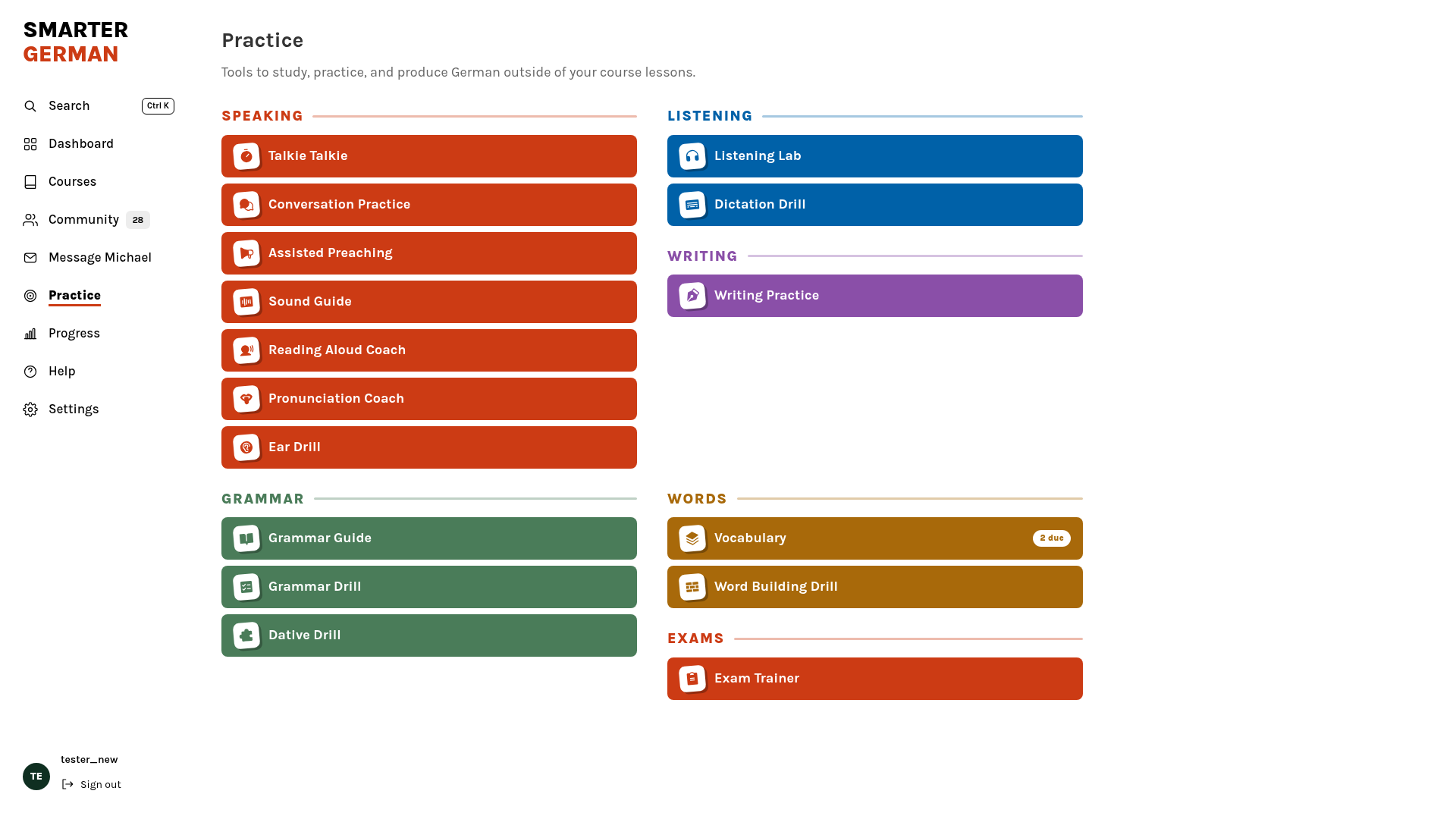
The Practice area makes the tools available independently of the current lecture.
This leaves room for different kinds of study days. Someone with energy for a new lesson can follow the course. Someone who keeps missing a sound can spend time listening more closely. A learner who understands a grammar explanation but cannot yet use it comfortably can do another round of grammar exercises. The structured course and the independent tools support each other.
Exam preparation has its own workspace. The Exam Trainer brings telc-like and Goethe-like practice papers into the platform. Learners can choose practice or test mode, work through sections, use the relevant timers and see their results. Writing feedback follows the exam’s assessment criteria, making it easier to see what needs attention before the next attempt.
Practice mode is there to help learners understand their mistakes. It provides audio transcripts and highlights the relevant parts of the material for each question or task, so learners can see why an answer fits. Test mode adds the relevant time limits. Section results help turn an attempt into a plan: which part needs another look, and where would another hour of practice be most useful?
Speaking preparation provides a place to practise spoken answers. The aim is useful preparation and clearer feedback about where to spend the next study session.
Choose an exam
Work through a paper
Progress you can actually see
Teachable already showed course completion. I wanted a broader picture of the learning behind that percentage. The new Progress page brings together completed lectures, study time, study days, skills and insights. Learners can also create a learning record for an employer or institution.
Finishing a lecture and mastering a skill are different things. Seeing activity and results alongside course completion helps make that distinction visible. The figures below belong to my tester account and illustrate the interface.
It is easy to forget how much work you have done when the next difficult topic is right in front of you. A record of study activity and practice results gives you something concrete to look back on. It can also help identify an imbalance: perhaps you have been reading regularly but have given speaking very little attention.
One learner described the change soon after moving to the new platform. What stayed with me was the feeling of being supported and seeing progress more clearly:
“On the old platform, finishing a lesson felt like a chore. Since using the new one, I feel supported: it recognises what I’m good at and helps with what I find difficult. I can see my progress more clearly, and that makes me happy and excited for the next lesson. Thank you, Michael. Your effort paid off.”
This is one learner’s early impression, and it expresses something I hoped the platform would make easier: feeling supported while doing the work. Learning still requires time and repetition. Seeing progress and knowing where to find help can make it easier to return for the next session.
The community is part of the learning home
The community now sits alongside the courses. It is a place to ask questions, exchange experiences, find a study partner and hear about changes. Lecture-linked discussions give questions a useful starting point. Updates and resources have their own place, too, instead of needing a separate visit to Circle.
For independent learners, that connection matters. Studying on your own does not mean every question has to stay in your own head. Bringing the community into the same environment makes it easier to move from individual work to a conversation, while keeping the course available when you are ready to continue.
A few settings that make daily study easier
The settings cover practical choices: light or high contrast dark appearance; a daily pace for adding new vocabulary; explanations of highlighted grammar terms; whether to enable the study assistant; and study reminders. Learners can adjust these to suit their routine instead of adapting their routine to a fixed interface.
These choices are deliberately practical. A daily vocabulary pace helps keep new words manageable. Marked grammar terms open a short explanation when clicked. Reminders can support a routine, and the appearance options let someone choose what is comfortable on their screen. AI assistance is a choice learners make for their own account.
Light
High contrast dark
What made this possible for one person
I built the platform myself with extensive help from AI. An assessment prepared on 8 October estimated a conventional replacement build at around €1.7 million, within a broad €1 million to €2.5 million range. That estimates equivalent development work. It is neither money I spent nor a valuation of my company.
I could never have afforded to commission that work in the usual way. I do not believe this platform would have come to life so quickly, or perhaps within my lifetime. AI changed what I could build. Years of teaching and listening to learners gave me a reason to build it this way.
The estimated replacement cost helps explain the scale of that change for an independent educator. It does not mean the work became effortless. More than 2,500 hours still went into deciding how things should work, connecting them, testing them and going back over the details. I had to bring the teaching judgement and keep checking the result.
The part I value most is being able to continue. Launching a tool used to come with the question of how I would pay for the next change. I now have much more freedom to improve the material and the software together as learners show me what they need.
Next: iOS and Android
One practical advantage of my own app is that my learning tools work there together, including dictation, writing and AI features. That was simply not possible for my custom tools in the otherwise lovely Teachable app. I wanted learners to have the whole learning environment with them on a phone, with the tools available where they are needed.
The platform already works in a mobile browser. Dedicated iOS and Android apps are coming, with offline access planned for lessons that do not need AI. That should make it easier to study on a train or wherever the connection is unreliable. AI features will still need an internet connection.
The purpose of the apps is to make the same learning home easier to carry into everyday life. Some sessions happen at a desk, others in a small gap in the day. A phone should give learners a clear way back into their material, with the appropriate tools close at hand.
Before - Teachable browser
Now - SmarterGerman browser
For existing learners, the move is free. Subscription prices and access periods stay the same. Progress is not copied automatically from Teachable, but learners can set their current position for each course in one go, without clicking through every earlier lecture.
I’m glad the new home is finally being used. The most encouraging result so far is hearing that learners feel less alone with their questions, and more able to see the work they are putting in.
If you could design your own workspace exactly as you wanted, what would you change? And what would you need to make it happen?